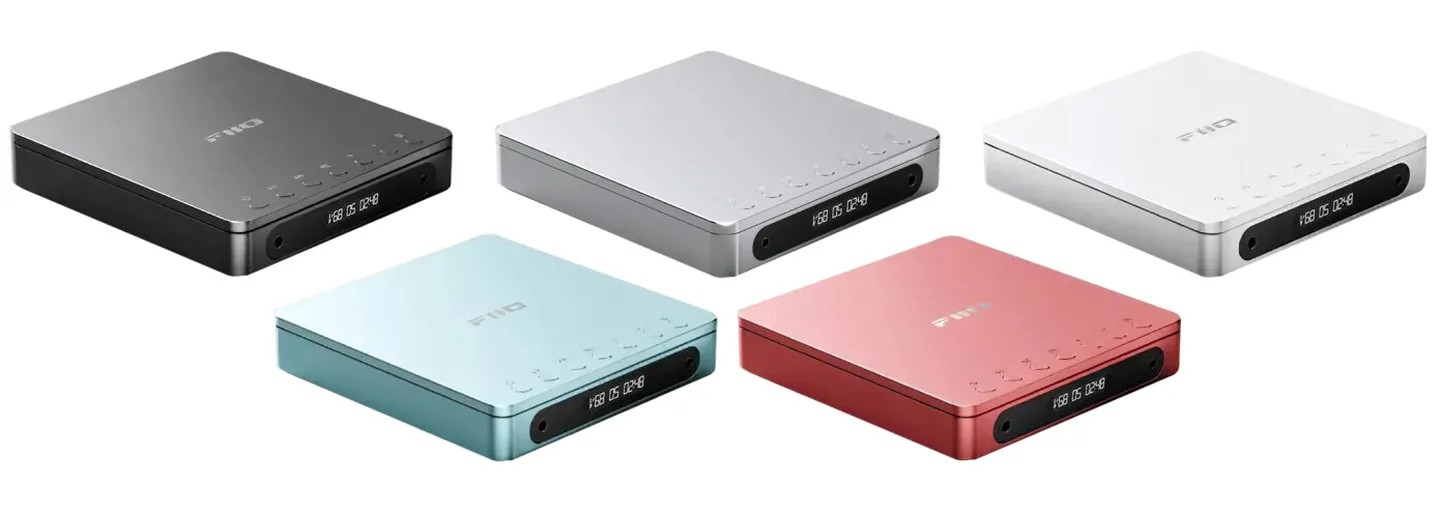
FiiO DM13 BT Refurbished

Product information "FiiO DM13 BT Refurbished"
Portable CD player with Hi-Fi output

  • Specially designed audio architecture 
  • Flagship DAC CS43198*2 
  • 660 mW+660 mW output power 
  • Customised LCD display 
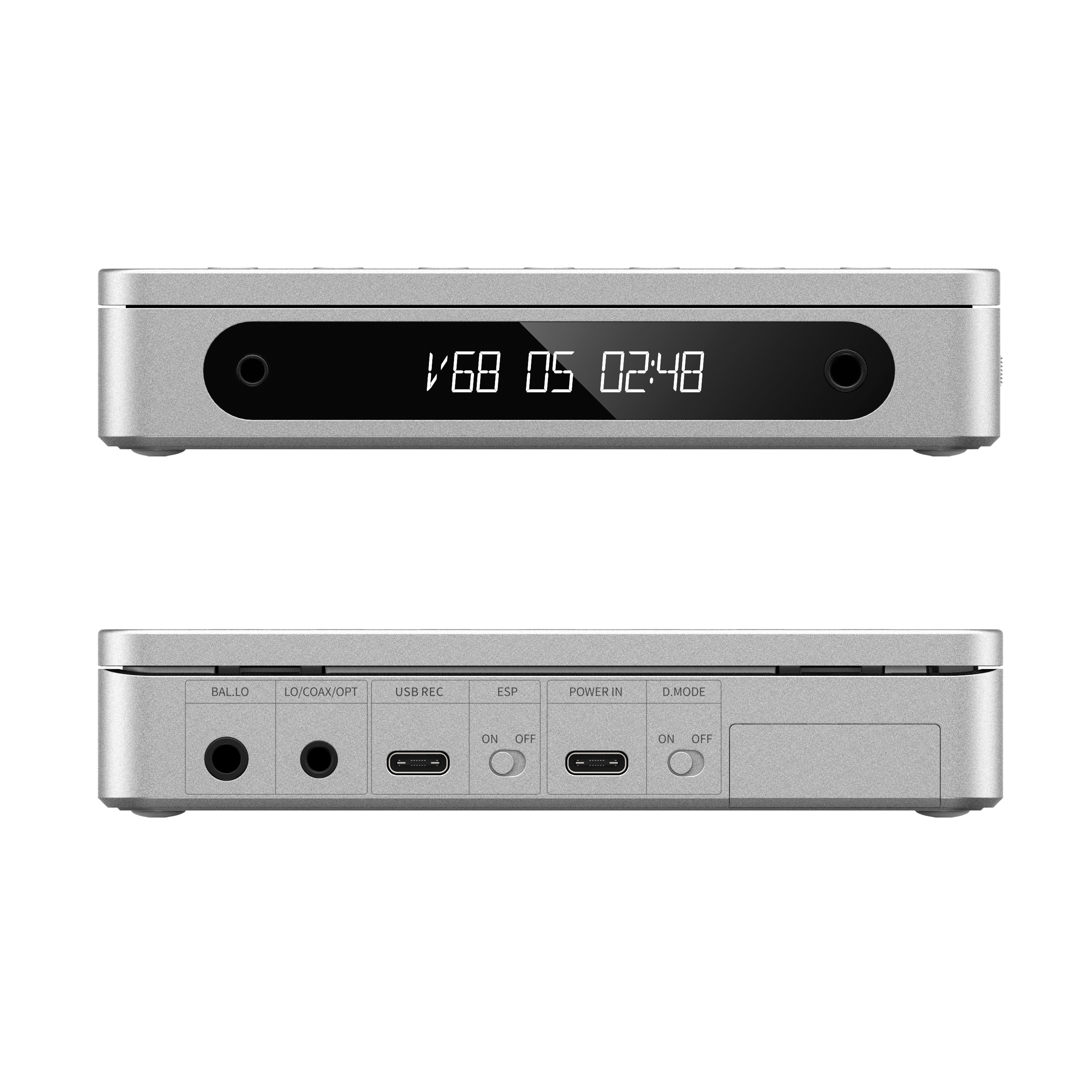
  • 3.5 mm+4, 4 mm headphone outputs 
  • Optical/coaxial digital outputs 
  • Dual desktop-portable power supply modes 
  • USB CD ripping 
  • aptX HD Hi-Res Bluetooth transmitter

Specially designed audio architecture
The FiiO DM13's specially designed audio architecture pairs two flagship Cirrus Logic CS43198 chips with two SGM8262 low-noise hi-fi headphone amplifiers. The combination of two DACs and two amplifiers enables the portable CD player to produce truly high-quality sound. 

High-quality ‘core’ for smoother volume control
Flagship DAC 2x CS43198 Unlike most portable CD players, the FiiO DM13 uses two flagship CS43198 DAC chips, which offer high performance and low power consumption for excellent audio quality. FIIO engineers have also specially designed an output stage that better captures the sound of the DAC, with the same DAC chip controlling the volume. The DAC chip allows for 99-step fine volume adjustment, which not only allows for smooth volume changes, but also makes the sound clearer at any volume. 

Tiny body - Enormous performance
The FiiO DM13 may be compact, but it offers impressive performance that sets it apart from other similar products. Not only can it drive most headphones, but it can also be connected to powered speakers or other headphone amplifiers for an exceptional listening experience. 

Portable CD player- Useful anywhere 
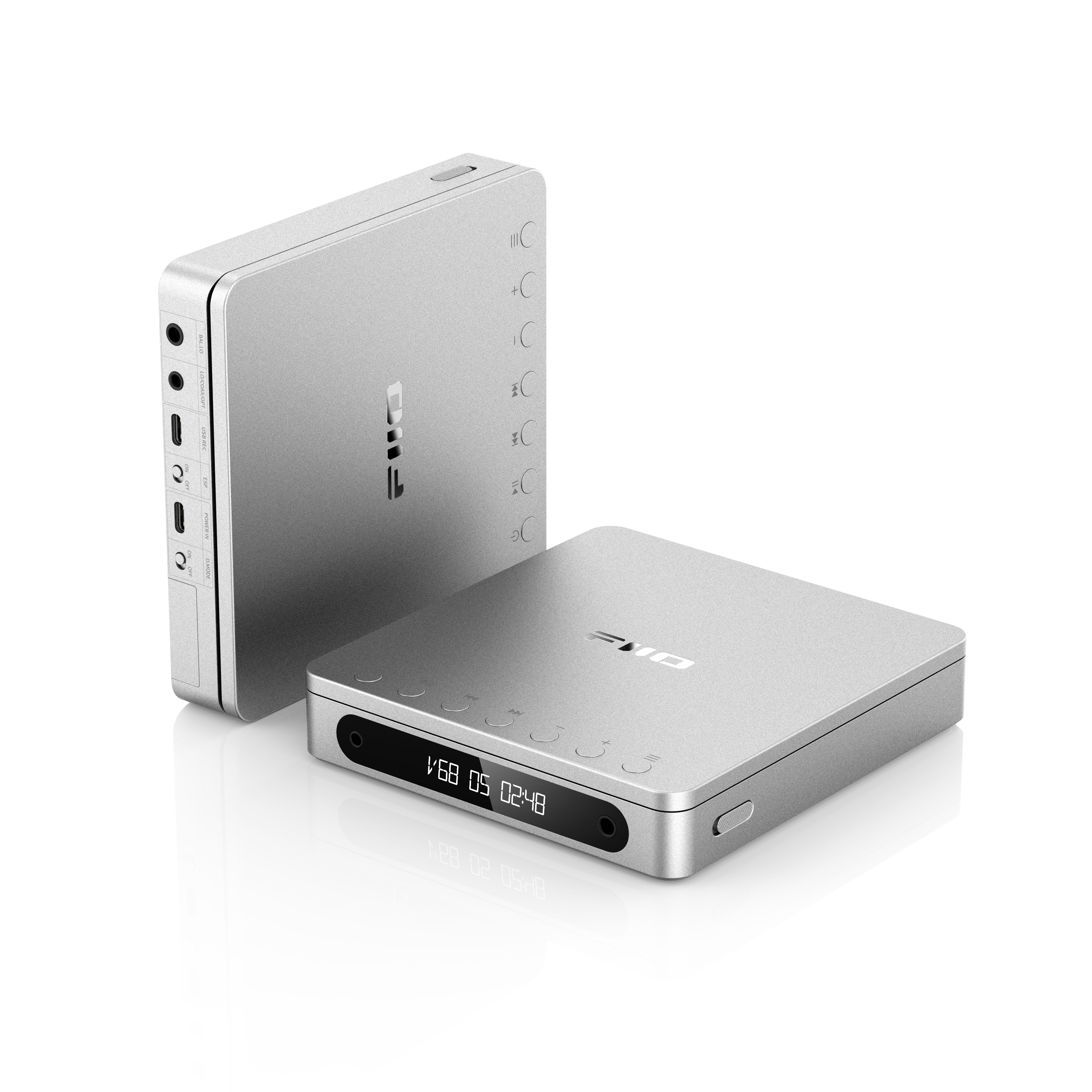
FIIO designers have combined manufacturing artistry and structural design to shrink the FiiO DM13 to a size smaller than most other CD players, with dimensions of approximately 144 x 137 x 27 mm (excluding feet). The DM13 also features an ESP (electronic skip protection) switch, ensuring a stable and enjoyable listening experience whether you're on the move or standing still. 

Stable CD reading - Pay attention to everything
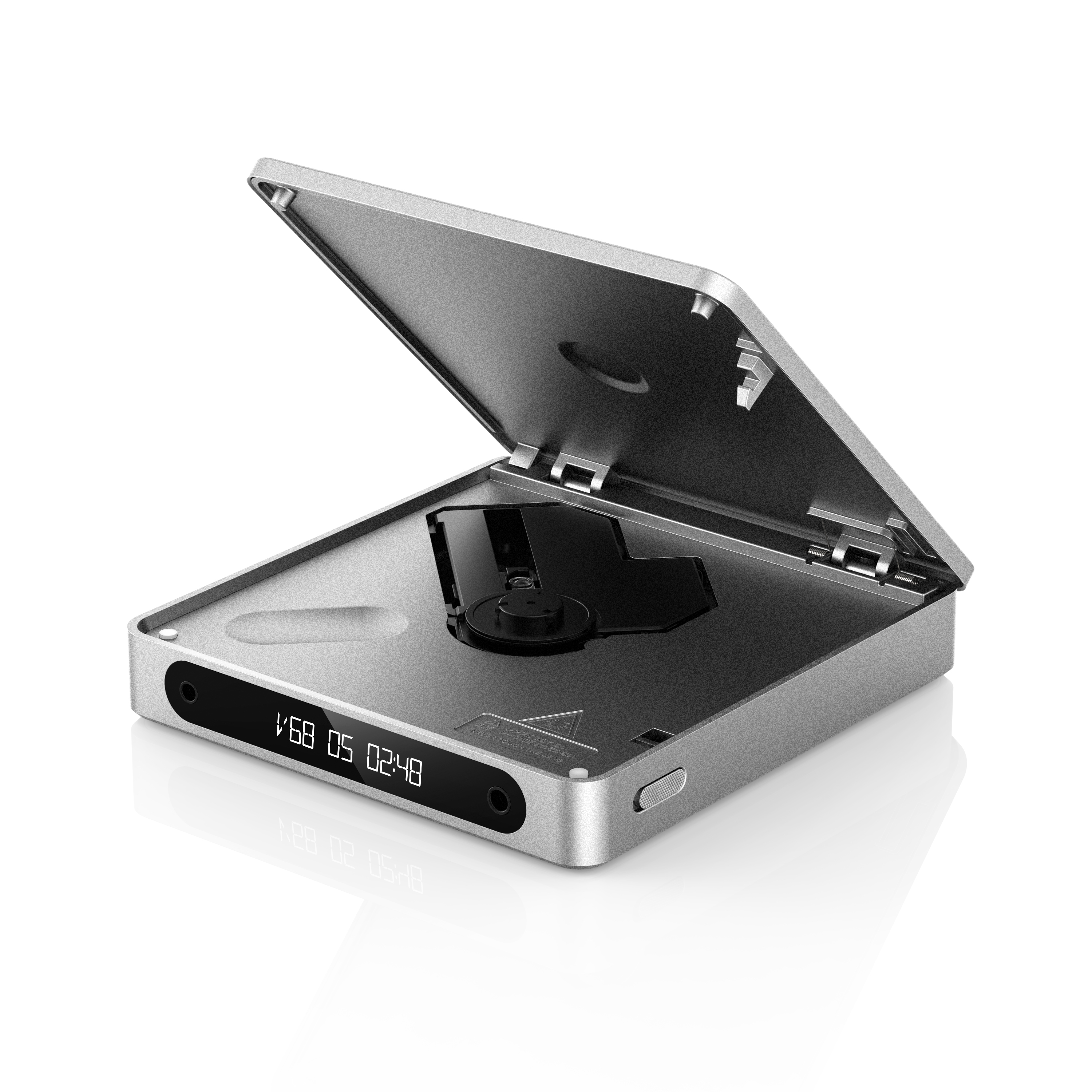
By lightly pressing the lever, the lid opens effortlessly so that you can insert your disc. This gives your music a physical presence that cannot be found with digital-only playback. The spacious disc tray significantly reduces the likelihood of scratches during high-speed rotation and provides maximum protection for your favourite discs. *Due to technical limitations, the above measures reduce the likelihood of discs being scratched, but cannot completely eliminate it. 

Customised LCD display - Reliably clear
The high-contrast, durable LCD display clearly shows the volume, track number and playback duration of the song and makes the status of the device easy to understand. Even with prolonged screen use, it won't burn in, giving you one less thing to worry about. 

3.5 mm + 4.4 mm dual headphone outputs
3.5 mm and 4.4 mm outputs: for connecting headphones Single-ended and balanced line outputs: for connecting to powered speakers or amplifiers 

Optical/coaxial digital outputs
Special low-jitter crystal oscillators ensure accurate synchronisation of the digital clock, resulting in cleaner and more stable digital signal transmission. Optical and coaxial digital outputs: for connection to an external DAC 

USB CD ripping - More ways to play 
You can rip your favourite CDs to WAV files stored on a portable storage device and easily share them with friends and family. The WAV music files on this portable storage device can then be easily transferred to other computers or phones, so you can play the music on your CDs anytime, anywhere. * Supports FAT32 formatted storage devices only. 

aptX High-Res Bluetooth - Convenient wireless connections that also sound great 
Unlike traditional Bluetooth portable CD players, the DM13 BT features a Qualcomm Bluetooth platform that provides high-resolution Bluetooth audio with support for aptX, aptX Low Latency, aptX HD codecs as well as the standard SBC codec. This high-quality wireless transmission improves the Bluetooth sound quality of portable CDs. 

Patented Desktop Mode - Relaxed Listening 
FIIO's highly acclaimed Desktop Mode is now available for the DM13. When connected to a USB power source, simply slide the D.MODE switch to ‘ON’ and the DM13 will be powered directly via USB without consuming battery power, extending battery life. *When the remaining battery capacity reaches 0% and the device is forcibly switched off, the battery will start charging regardless of the current mode. 

Long battery life - 10 hours of playback with lithium batteries 
The DM13 is powered by a specially selected 3750 mAh, 3.8 V cobalt-lithium battery. You can take the DM13 anywhere and listen to music for 10 hours* - more than enough for even the longest listening sessions. *Data from FIIO Labs. Actual results may vary due to usage conditions that differ from test conditions. 

Gapless Playback - Smooth Playback 
In the early stages of developing this product, FiiO gathered extensive feedback from users and overcame many challenges to carefully develop a range of user-friendly and thoughtful features - including gapless playback, the ability to save favourites, and loop playback. The loop playback function supports loops on a single track, random tracks and even the entire CD - so you can customise playback to your liking. 

High quality materials - Luxurious and durable
The aluminium alloy casing perfectly combines texture and feel while ensuring the structural strength of the device. Precision-machined aluminium alloy components are used for the critical hinge, offering greater wear resistance and durability. *Rigorous testing in FIIO laboratories has shown that the hinge can be reliably closed and opened > 5000 times. 

Colourful and vibrant - A unique style
Discover how different colours can create different moods. Soon available in silver, black, red, white and white with skylight effect. This is not only a portable CD player with great sound, but also a stylish accessory that can literally make your music journey more colourful.
Specifications
Power supply: 5 V⎓2 A (Type C) 
DAC: CS43198*2 
Headphone amplifier: SGM8262*2 
Display: 1.5-inch LCD 
Headphone outputs: 3.5 mm unbalanced + 4.4 mm balanced 
Line outputs: 3.5 mm LO/COAX/OPT + 4.4 mm balanced LO 
Output power 1: L+R≥180mW+180mW (32Ω, THD+N<1%/single-ended) 
Output power 2: L+R≥660mW+660mW (32Ω, THD+N<1%/balanced) 
Single-ended line output level: L+R=2.5Vrms+2.5Vrms 
Balanced line output level: L+R=5Vrms+5Vrms 
Bluetooth output codecs: aptX HD/aptX Low Latency/aptX/SBC (Bluetooth version only) 
Supported CD-R formats: FLAC/WAV/WMA/MP3 (only supports CD layer of SACD discs) 
SNR: ≥124 dB (A-weighted) 
Noise floor: PO: ≤2.4 μV (A-weighted), BAL: ≤2.8 μV (A-weighted) 
THD+N: ≤0.0024 % (1 kHz/0 dB at 32 Ω) 
Battery capacity: 3750 mAh 
Battery life: ≥10 hours 
Dimensions: approx. 144*137*27 mm (without feet) 
Weight: approx. 450 g
FAQ

Wie schalte ich den Bluetooth-Modus ein?

Um in den Bluetooth Modus zu gelangen, drücken sie nach dem Einschalten einmal auf den Einschaltknopf und wechseln sie in den BLUE OUT Modus, das Pairing beginnt, versetzen sie ihren BT-Kopfhörer in den Pairing Modus und warten sie, bis sich der DM13 mit ihrem BT-Kopfhörer verbunden hat.

Wie benutzt man die Bluetooth-Sendefunktion der DM13? 

1) Nach dem Einschalten des DM13 kurz auf die Einschalttaste drücken, um in den Modus „BLUE OUT“ zu gelangen.

2. Drücken Sie lange auf die vorhergehende Taste, um in den Pairing-Modus zu gelangen. Der Bluetooth-Kopfhörer muss sich ebenfalls im Pairing-Modus befinden. Die beiden Geräte koppeln sich automatisch. 3. Nach erfolgreicher Kopplung zeigt der DM13 den entsprechenden Bluetooth-Code und den Abspielfortschritt an. 

Wie gelangt man in den Pairing-Modus? 

Drücken Sie die vorherige Taste im Bluetooth Modus, der DM13 wechselt in den Pairing Modus. 

Drücken Sie die nächste Track-Taste im Bluetooth-Modus, um das Pairing zu löschen, DM13 wechselt automatisch in den Pairing-Modus.

Wie kann der Batteriestand des DM13 überprüft werden?

In der Statusanzeige bedeutet BAT5 volle Batterie, BAT4 80~90% Batterie, BAT3 60~80% Batterie, BAT2 40~60% Batterie, BAT1 20~40% Batterie, BAT0 schwache Batterie (muss geladen werden).

Es wird empfohlen, den DM13 mit einem 5V-2A Netzteil zu betreiben.

Für den Langzeitbetrieb wird empfohlen, ein Netzteil mit stabiler 5V-Spannungsversorgung zu verwenden, nicht jedoch ein Netzteil mit Schnellladefunktion!

ESP 

Electronic Shock Protection (ESP) ist ein praktisches Feature, das sicherstellt, dass Ihr MP3-CD-Player die Musik ohne Aussetzer abspielt, selbst wenn er während der Fahrt geschüttelt oder angestoßen wird. Geräte mit ESP verfügen über einen intelligenten elektronischen Puffer, der verschiedene digitale Musikformate wie MP3 und WMA speichern kann. Der Puffer passt seinen Inhalt und die Abtastgeschwindigkeit des Lasers automatisch an, um einen reibungslosen Musikgenuss zu gewährleisten. Der DM13 verfügt über eine ESP-Funktion, die vom Benutzer aktiviert oder deaktiviert werden kann; audiophilen Musikliebhabern, denen die Klangqualität wichtig ist, wird empfohlen, ESP auszuschalten. 

ESP-Kompressionszeit nach der ESP-Wiedergabe: Normale CD-Discs haben ESP 60 Sekunden vor der Wiedergabe, MP3-Discs haben 120 Sekunden vor der Wiedergabe.

Unterstützt DM13 die lückenlose Wiedergabe?

Ja, das wird unterstützt. 

Unterstützt das DM13 USB-Audioausgabe? 

Der DM13 unterstützt keinen USB-Audioausgang. Der digitale Ausgang unterstützt nur koaxiale und optische Ausgänge.

Welche Abspielmodi unterstützt das DM13?

Der DM13 unterstützt die Wiedergabemodi „Alles wiederholen“, „Einzelwiederholung“, „Zufallswiederholung“ und „Play Stop“ bis zum Abspielen des letzten Titels.

Desktop Mode (D.MODE) Schalterfunktion 

Wenn der Schalter auf ON gestellt ist, ist der Desktop-Modus aktiviert und das Gerät wird direkt über den USB-Anschluss mit Strom versorgt, ohne dass der Akku verwendet wird. Wenn der Schalter auf OFF steht, ist der Desktop-Modus deaktiviert und der Akku kann sowohl Strom liefern als auch normal geladen werden. - Der Akku wird geladen, wenn das Gerät mit dem Stromkabel verbunden ist, unabhängig vom Status des D.MODE-Schalters.

Wie behandle ich den Absturz des DM13 und andere Probleme? 

Wenn Sie das Gerät gerade erst erhalten haben und es sich nicht einschalten lässt, vergewissern Sie sich, dass der D.MODE-Schalter auf der Rückseite auf OFF steht. 

Warum lassen sich manche Geräte nicht durch sanftes Schließen des Deckels schließen? 

Der Hersteller hat bei der Entwicklung verschiedene Nutzungsszenarien berücksichtigt. Vor allem im portablen Einsatz, z.B. in der Tasche, soll sich der Deckel nicht mit einem leichten Ruck öffnen lassen. Deshalb wurde der Druckknopf so gestaltet, dass er sich schwerer anfühlt. Wenn der Druckknopf zu leicht ist, lässt sich der Deckel nicht so leicht schließen. Dies ist ein normales Phänomen, bei dem sich der Deckel nur mit etwas Kraft schließen lässt.

Wie benutzt man die lokale Wiedergabefunktion des DM13? 

1. Nach dem Einschalten der DM13 kurz auf die Ein/Aus-Taste drücken, um in den „PRE OUT“-Modus zu wechseln.

2. Schließen Sie den entsprechenden PO- oder LO-Ausgang an der Vorder- oder Rückseite an, und klicken Sie auf „Wiedergabe“.

Hinweis: 3.5 und 4.4 Ausgänge können gleichzeitig ausgeben.

Wie benutzt man den koaxialen/optischen Ausgang des DM13? 

1. Nach dem Einschalten des DM13 kurz auf den Einschaltknopf drücken, um in den Modus " SPDIF OUT " zu wechseln. 

2.Verwenden Sie einen entsprechenden optischen oder koaxialen Adapter, um den DM13 mit dem entsprechenden Dekodiergerät zu verbinden.

3.Der DM13 kann sowohl koaxiale als auch optische Signale ausgeben.

Wie kann ich meine Favoriten hinzufügen? Wie kann ich meine Favoriten abspielen, nachdem ich sie hinzugefügt habe? 

Hinzufügen: Drücken Sie während der Wiedergabe lange auf die letzte Funktionstaste, um den aktuellen Titel zur „Favoriten“-Liste hinzuzufügen.

Wie abspielen: Wenn in der „Favoriten“-Liste bereits Titel hinzugefügt wurden, drücken Sie während der Wiedergabe lange auf die Wiedergabetaste, um die gespeicherte „Favoriten“-Liste aufzurufen, und die Titel werden der Reihe nach entsprechend der fortlaufenden Nummer abgespielt. 

Anmerkung: Die Favoritenliste wird ungültig, wenn Sie die Discs wechseln oder die Wiedergabe beenden.

User Manual
Informationen zum Hersteller
GUANGZHOU FIIO ELECTRONICS TECHNOLOGY CO LTD
No.21, Longliang Road, Xialiang Village,Longgui Street, Baiyun District,
510430 GuangZhou, CHINA
www.fiio.com
support@fiio.com
EU-Verantwortlicher
NT Global Distribution GmbH
Buntentorsdeich 10
28201 Bremen
Deutschland
www.nt-global.de
info@nt-global.com